Anatomy · a skill for Claude Code
Name an idea in one line, and Claude draws the machine that does it.
- /anatomy
- 33 figures, all live
- by Ryan
- 9 October 2026
- Install ↓
Most explanations of how something works are drawn as boxes and arrows. They tell you the parts exist, but not what the parts do, and the reader has to imagine the motion the arrows stand for. I wanted Claude to draw the thing itself: a real object whose moving parts behave the way the idea does.
Anatomy is a skill for Claude Code that does this. You name an idea in one line, Claude invents a machine that does it, and draws it as a live isometric figure you can turn, press and read. Every figure is made of dozens to hundreds of small solid parts, and every number it shows comes from the same model that moves them.
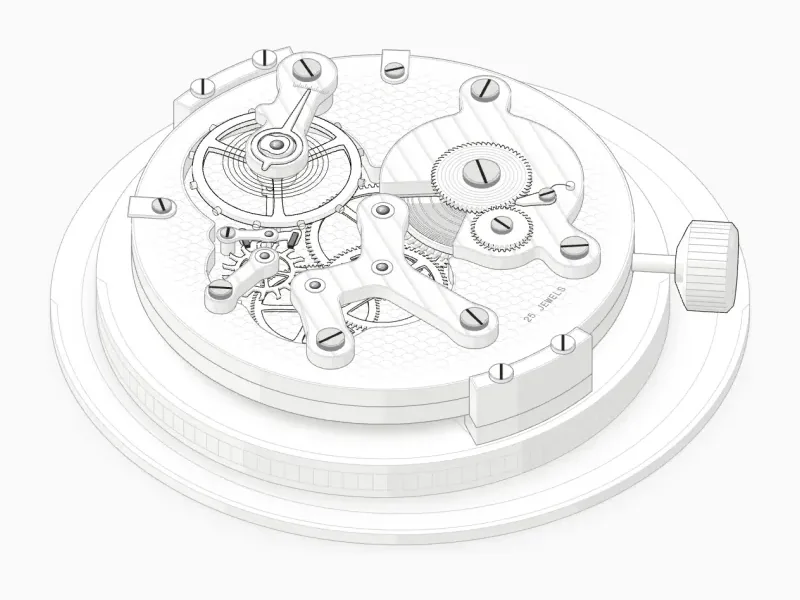
This is a mechanical watch movement. It came from one line, /anatomy explain how a mechanical watch keeps time, interactive, and just under two hours of Claude working on its own.1One hour and fifty-four minutes of active time, built in one pass and checked by the same agent.
Drag the crown upward to wind it: the ratchet turns, the click ticks and the power reserve climbs. Press S to slow time to a twentieth, and again to a hundredth, and you can watch the pallet fork let the fifteen-tooth escape wheel through half a tooth at a time. Press E to lift the bridges apart and see the train underneath, its wheels cut to true ratios: the fourth wheel turns once a minute and the centre wheel once an hour.
Objects, not diagrams
The skill rests on one rule, written at the top of its instructions, above everything else:
The object is the explanation.SKILL.md, “The one idea that matters”
No boxes, no arrows, no labels floating in space. Claude has to invent a real, well-made thing whose working is the concept, and say in one sentence what moves and what that motion means.
A figure fails in two ways, and I watched it fail both ways many times before the rule existed. Too abstract: stacked plates, floating slabs and labelled boxes that don’t read as anything. Too flat: one big slab with a few lines on it, with no volume, no parts and nothing to discover. The cure for both is the same, a recognisable machine built from many small parts that each do something.2The machine is never copied from a reference picture. A reference can give the finish, the materials and the mood; the object is invented.
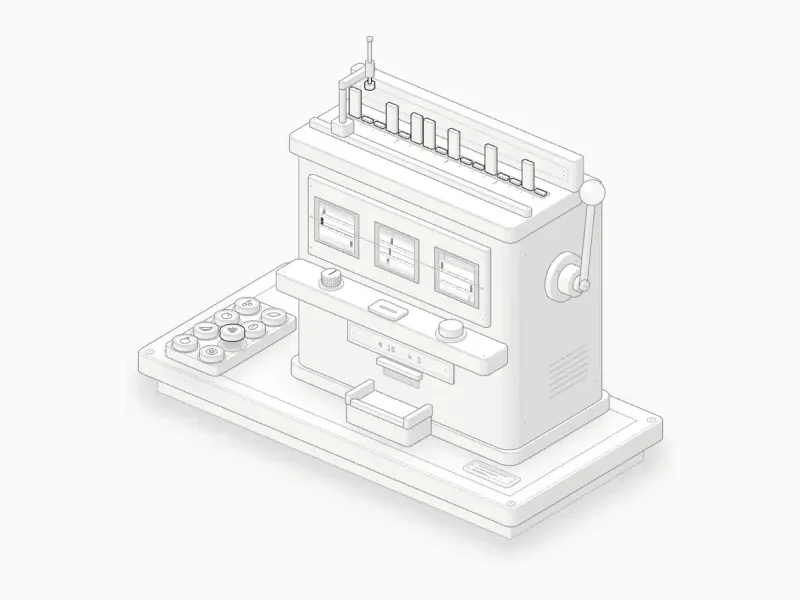
Some ideas map almost by themselves. A queue is a marble run: two hoppers feed one sloping lane, and the marbles wait in order behind an escapement until a timer drum takes them. A cache that forgets its oldest entry is a bookcase with four places on top, most recently used at the left. Others take more invention. A bloom filter is a fruit machine whose three reels are the three hash functions, and it only pays out when all three of a word’s flags are already up.
Sorting deskHash map collisions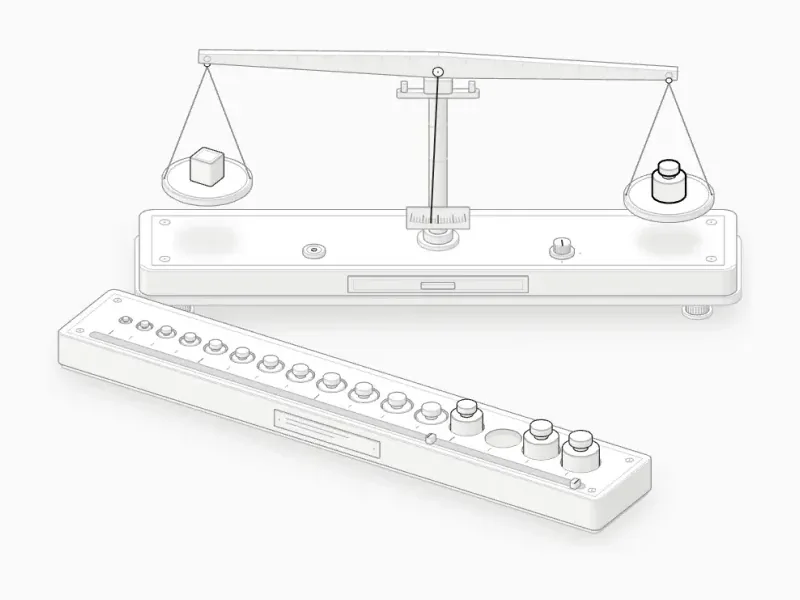 Lab balanceBinary search
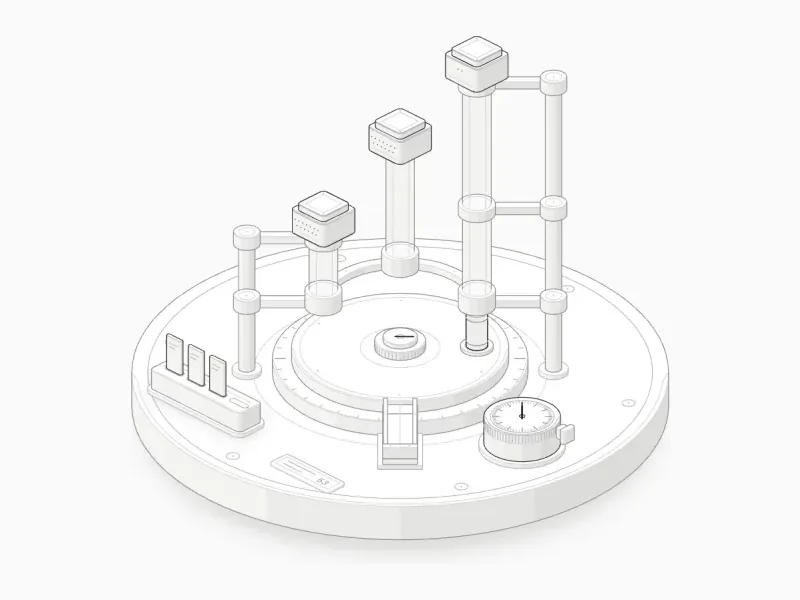 Pneumatic tubesDNS resolution
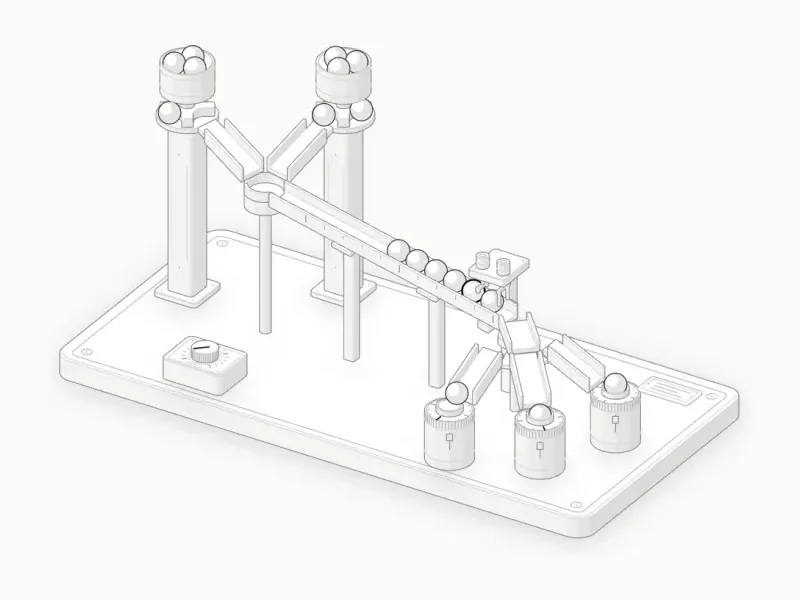 Marble runMessage queue
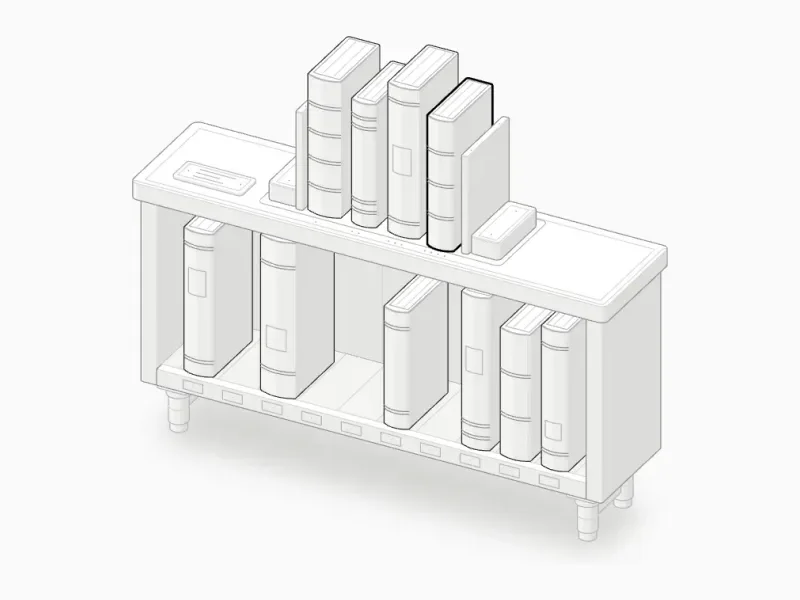 BookcaseLRU cache
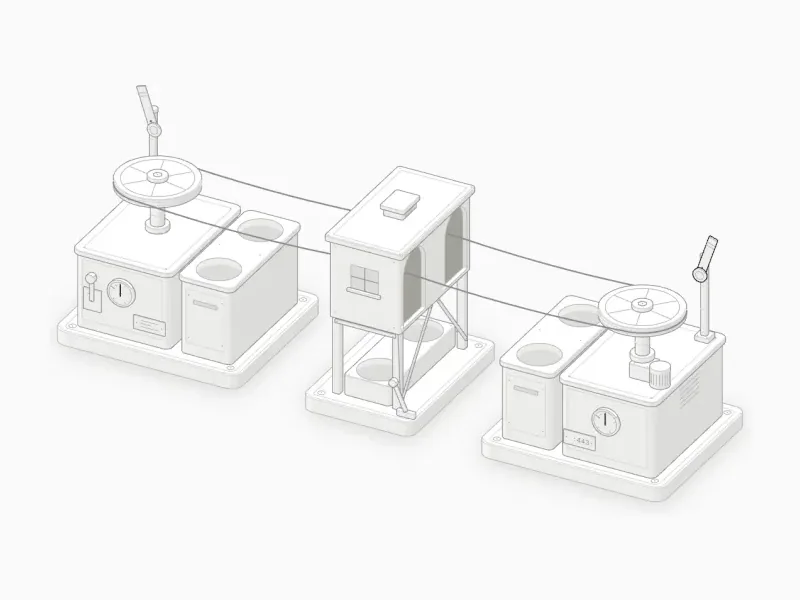 Mail ropewayTCP handshake
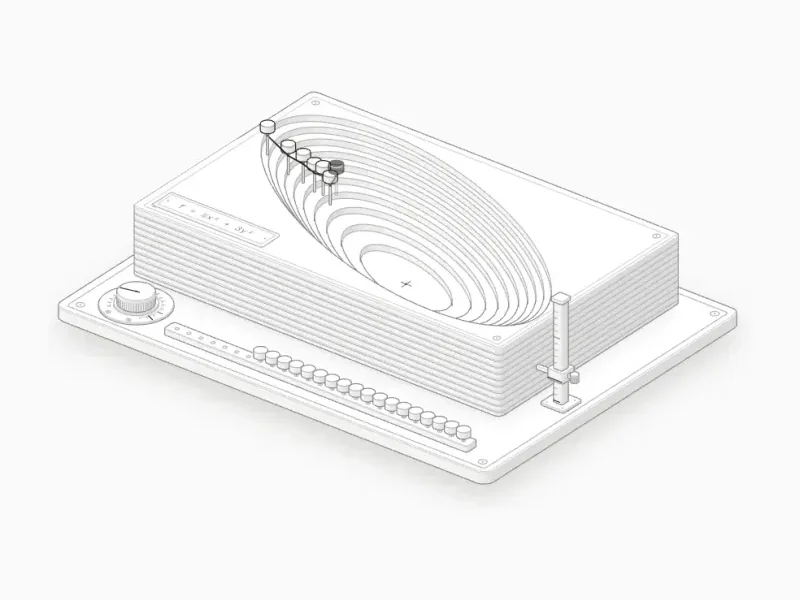 Contour modelGradient descentFruit machineBloom filter
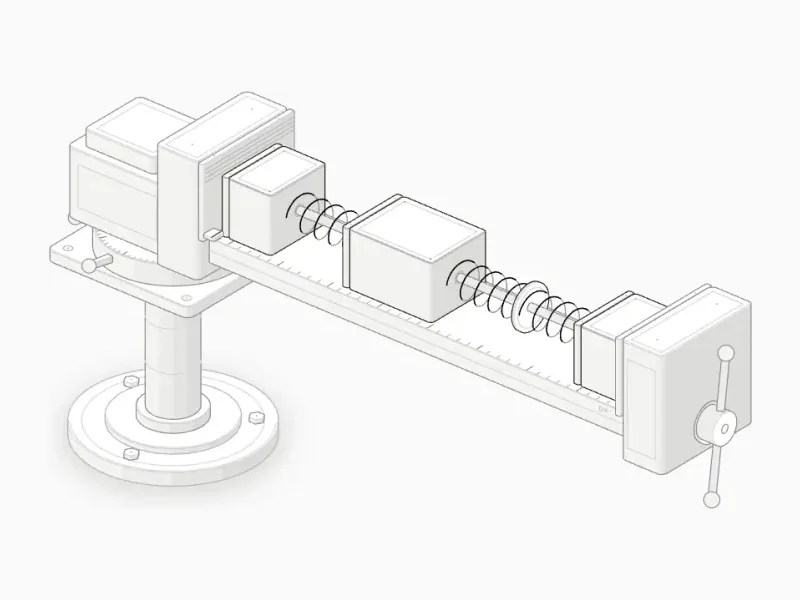 Bench viseflex-grow
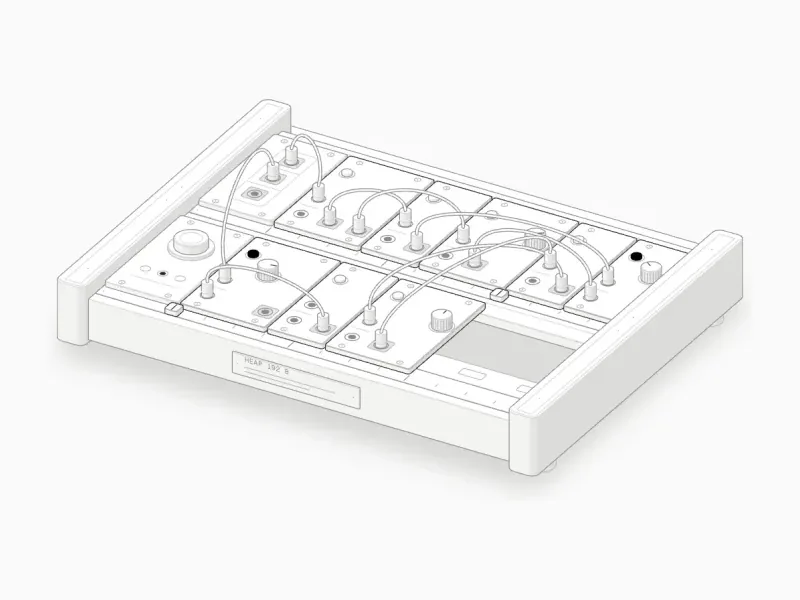 Modular synthMark and sweep
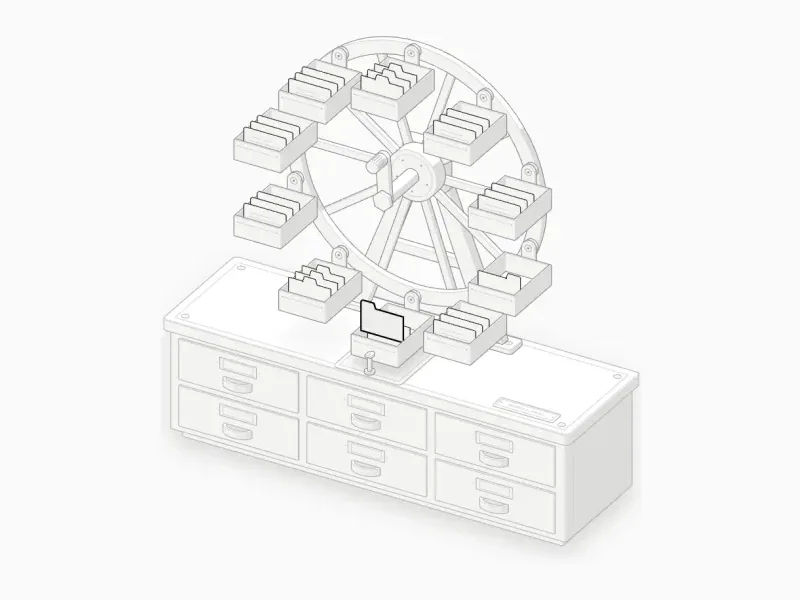 Rotary card fileB-tree index
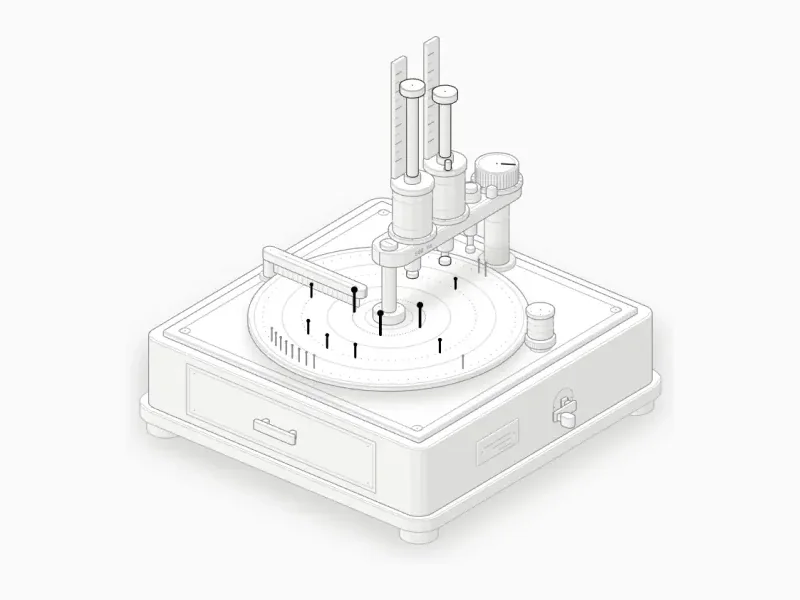 Music-box recorderDebounce, throttle
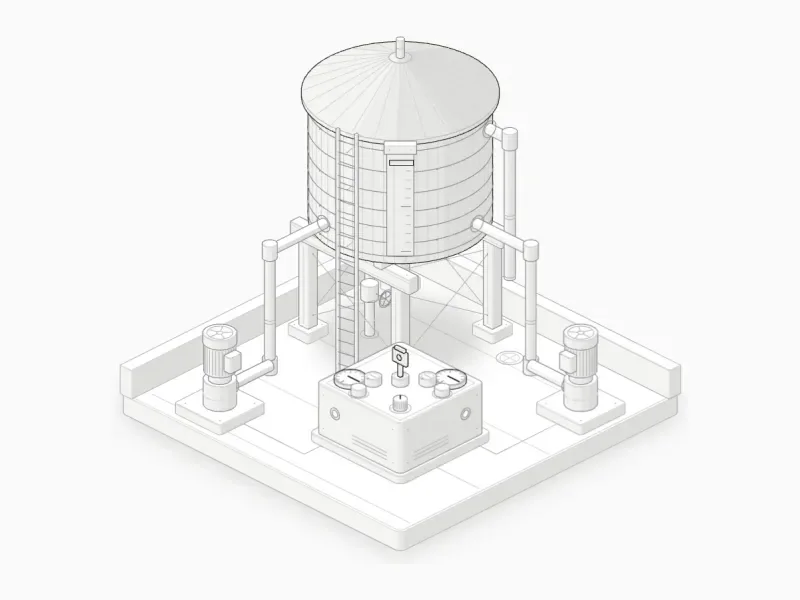 Tank and keyMutex
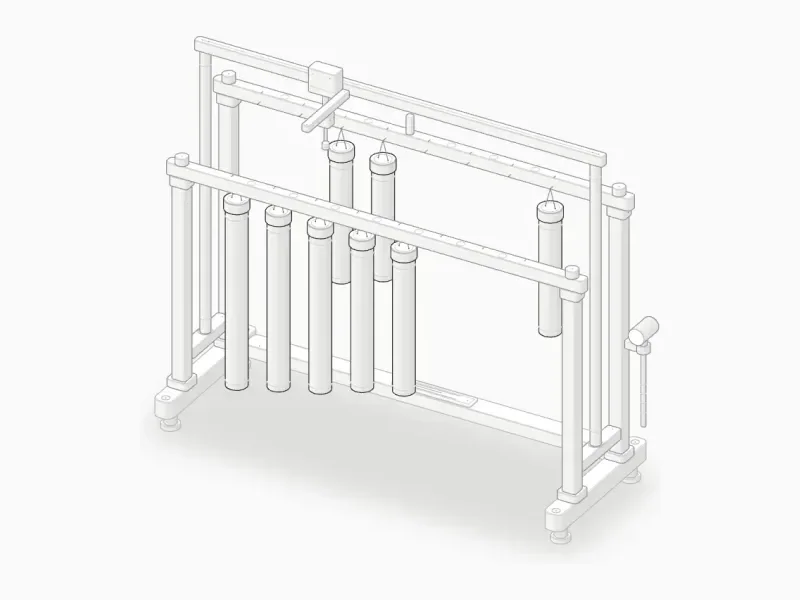 Chime rackMerge sortRoulette wheelTemperature
None of these were drawn by hand. Each one started from a single line naming the idea. There are 33 so far, all live in the collection.
Writing a prompt
The prompt is the idea, not the drawing. I almost never say what to draw. “Explain how an LRU cache evicts entries” is enough, and deciding that it should be a bookcase is the part Claude is asked to do.
Three words change what you get, and Claude only reaches for them when you write them in the line:
interactive | The figure answers the pointer and the keyboard: drag, press, hold a key. Leave it out and you get a still drawing. |
|---|---|
WebGL | Shaders for fire, water, plasma, moving air and light, drawn inside the same isometric camera as the parts. |
3D | Parts that really turn in depth, re-projected and re-sorted every frame, instead of only looking isometric. Slow: hours to build, not minutes. |
If you already know the object, name it, with whatever true numbers matter. And if the figure is going somewhere in particular, say where. The skill writes framework-free TypeScript that outputs SVG and HTML, or React components for a Next.js site, in a dark or a light theme.
You don’t always need the command. The skill’s description covers any request for an explanatory diagram, a technical illustration or an interactive explainer, even one that never says “isometric”, so Claude reaches for it on its own.3Until a request matches, Claude sees only the skill’s name and its description. It reads the rest only when it needs it.
What Claude does
Between your line and the finished figure, Claude works through a fixed order. Most of the quality is decided in the first four steps, before any geometry exists.
Size it. Say up front whether this is a Figure, a Hero or an Epic, and roughly how long it will take.
Truth first. Collect the real numbers and behaviour, and write them as a small model that the motion and the readout both read.
Invent the object. A machine whose mechanism maps one to one onto the idea.
List the parts. At least forty, grouped into base, structure, mechanism, controls and the one lit subject. Each sits on another.
Plan the world. World units, plans as rounded rectangles and circles, a camera, then a fit to the card.
Build the geometry once. Every static path computed ahead of time. Moving parts are built at rest and moved.
Paint back to front. Sorted by depth, wrapping parts split in two, and the order proved by an audit once it gets dense.
Frame it. A card with a title, the interaction hint and a live readout. Words stay out of the drawing.
Make it live. Calm, time-based motion, an idle tour, pointer and keyboard, and stillness under reduced motion.
Verify like a critic. Screenshots, contact sheets, crops at four times and two automatic checks, until nothing is left to fix.
Step two looks like this in practice. The test rig, one of the skill’s examples, explains how a glass button swells and leans under a finger, and its whole behaviour lives in a small spring model. The parts, the readout, the screen-reader text and the caption all read from it, so none of them can disagree.
function spring(held: Spring, want: number, dt: number, [stiff, drag]: Tuning, calm: boolean) {
  const damping = calm ? 2 * Math.sqrt(stiff) : drag;
  const steps = Math.max(Math.ceil(dt * SUB_RATE), 1);
  const slice = dt / steps;
  for (let step = 0; step < steps; step++) {
    held.rate += (want - held.at) * stiff * slice - held.rate * damping * slice;
    held.at += held.rate * slice;
  }
  if (Math.abs(want - held.at) < QUIET && Math.abs(held.rate) < QUIET) {
    held.at = want;
    held.rate = 0;
  }
}
And step six. The dial gauge, the smallest example, starts with its base: four turned feet in depth order, a plate with a bevel, a groove inset five units from the edge, and a screw with a ring at each corner. Every one of those is a solid from the kit, not a line drawn by hand.
function plate() {
  const out = [`<path class="iso-halo" d="${k.haloOf(PLATE, -PLATE_H - FOOT_H, PLATE_H, P)}"/>`];
  for (const [x, y] of byDepth(k.corners(PLATE, 22))) {
    out.push(S(k.cylinder(x, y, 7, -PLATE_H - FOOT_H, 1.6, P, 28), { tone: "lo" }));
    out.push(S(k.cylinder(x, y, 5.4, -PLATE_H - FOOT_H + 1.6, FOOT_H - 1.6, P, 28), { tone: "mid" }));
  }
  out.push(S(k.slabOf(PLATE, -PLATE_H, PLATE_H, P, 8, 1.6), { tone: "mid" }));
  out.push(L(k.planOutline(k.insetPlan(PLATE, 5), 0, P), { tone: "lo" }));
  const screws = k.corners(PLATE, 10);
  out.push(L(screws.map(([x, y]) => k.ring(x, y, 2.2, 0, P, 16)).join(""), { tone: "lo" }));
  out.push(D(screws.map(([x, y]) => at([x, y, 0])), { size: 0.5 }));
  return out.join("");
}
The first step sets the budget. Every request lands in one of three sizes:
| Size | What it holds | Time |
|---|---|---|
| Figure | 40–80 parts, SVG with at most one shader | 30–90 min |
| Hero | 80–150 parts, several shaders or one turning part | 2–4 h |
| Epic | A whole vehicle, building or plant | 6 h or more |
A Figure is built without asking. A Hero is announced first, then built. An Epic is never started without you: Claude gives the estimate, proposes a Hero that keeps the core of the idea, and lists what the full version would add.4Whatever the size, there is a working page in the browser within the first hour. The rest of the time goes into deepening it.
Anatomy of a figure
Every figure follows the same drawing rules. They are what make it read as a solid, made thing rather than a sketch.
- One camera
- Isometric, looking down at 30° from a corner. Nothing in perspective, so parallel edges stay parallel.
- Solids
- Every part is filled and painted in order, so what is in front hides what is behind. No see-through edges.
- Four tones
- Each side is shaded by the way it faces the light, with a lighter top.
- One accent
- Exactly one part is lit: the one the reader should watch.
- Lines resolve
- Every line ends on a face, another line or a dot. No leader lines, balloons or arrows.
- Detail at 4×
- At normal size it reads as one machine. Zoomed in, every region still has something true to find.
- No words inside
- Text lives around the drawing, never on it, apart from one tiny engraved label at most.
- True numbers
- Every readout comes from the model that moves the parts.
A figure is also a small program. It plays an idle tour when nobody touches it, pauses when you hover or focus it, answers the pointer and the keyboard, stops when it scrolls off screen and goes still under reduced motion. Its readout is announced to screen readers as it changes.
On a page of its own, a figure sits in a card with its number, title, hint and live readout in the four corners. On this site I moved the hint and the readout into the margin beside each figure, so the drawing stands on the page by itself.
Six machines, up close
The collection reads best one machine at a time. Each of these names the idea, then the object Claude chose for it; open one to play with it.
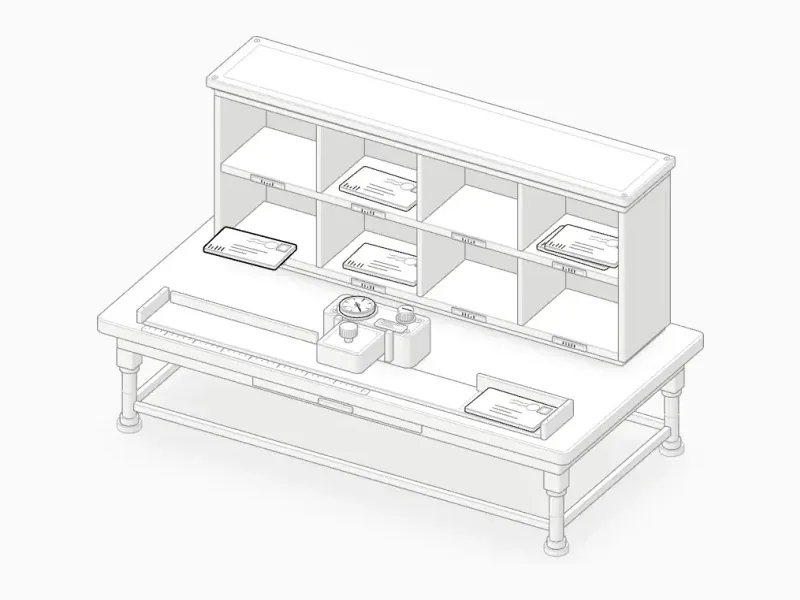
Hash map collisions
Sorting desk
A hash map files each key in a bucket, and keys that land in the same bucket pile up. A post-office sorting desk. A coding machine prints each letter's bucket, the hash of its name mod 8, and files it in that pigeonhole, on top of any letters already there.
Bloom filter
Fruit machine
A bloom filter can say “definitely not” for certain, but only “maybe” for yes. A fruit machine. Three reels are the three hash functions and a row of sixteen flags is the bit array; it pays out only when all three of a word's flags are already up.
Mutex
Tank and key
Two writers reading the same value at once will both act on a stale number. A water tank filled by two pumps. Without the interlock key both controllers read the same level and overfill it; with it, only the one holding the key may read and run.
TCP handshake
Mail ropeway
Before any data moves, both ends have to agree that the other one is listening. A mail ropeway between two stations. Canisters flying SYN, SYN with an ACK pennant, then ACK ride the rope across, and each station's semaphore shows its connection state.
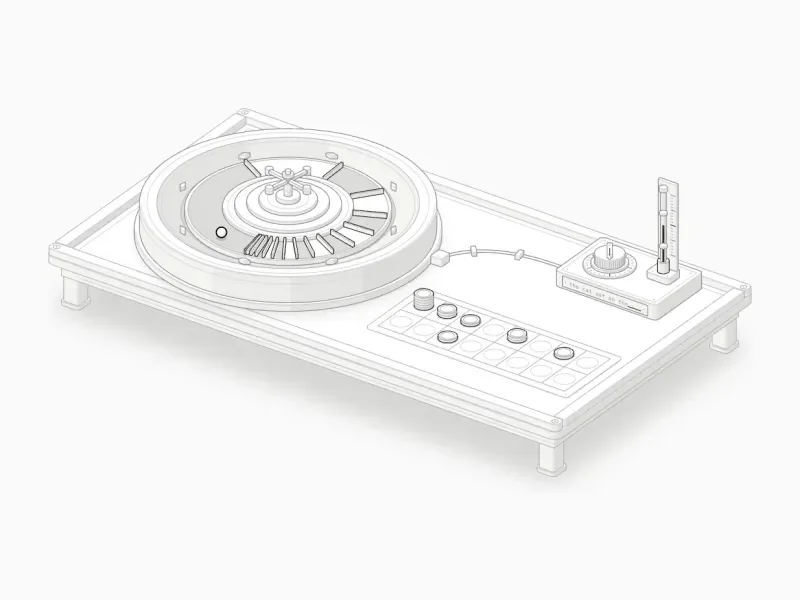
Temperature
Roulette wheel
Temperature reshapes the odds of the next token without changing which tokens are possible. A roulette wheel whose sixteen pockets are the likeliest next tokens, each as wide as its probability. A thermostat knob sets the temperature and moves the frets.
Debounce, throttle
Music-box recorder
Debounce waits for quiet; throttle lets one call through per window, however many arrive. A music-box recorder with a turning pin disc. Every click of the knob is a call; the throttle and debounce dashpots each set their own pins, so you can read when each function actually ran.
The pattern is the same every time. The object has to do the idea, not stand for it, so the thing you watch move is the thing being explained.
Two big machines
Small ideas make small machines. The big ones are where the skill earns its keep: hundreds of parts, real engineering numbers, and shaders that live inside the drawing rather than on top of it.
A Rolls-Royce Trent 970, the engine of the A380, hung from a ground-run thrust frame with its near upper quarter cut away. Drag the lever and the fan, intermediate and high-pressure spools wind up at their own speeds. The fan swallows 1.2 tonnes of air a second, most of it leaves as a cold bypass jet while the rest burns in the combustor, and the load cell reads the thrust climbing from 14 to 334 kN. Press Space for a take-off run.5The audit measured 6,320 overlapping pairs across 541 solids and found every one drawn in the right order.
Raptor 2, SpaceX’s full-flow staged-combustion engine, hanging in a test stand. It is one of the skill’s own examples and its reference for dense pipework. Hover it and it comes apart into eleven assemblies, from the gimbal to the nozzle; press I to fire it. Every drop of oxygen passes through an oxygen-rich preburner that spins the oxygen pump, every drop of methane through a fuel-rich one that spins the methane pump, and the two hot gases meet in a main chamber at 300 bar.6The plume, shock, splash and steam are WebGL, drawn between a back and a front SVG, so the stand passes in front of the flame.
The first working version took 38 minutes. Making it right took ten more hours, and an audit now proves that no pipe passes through anything, at rest, apart and in every frame between.
Three layers
Most figures are pure SVG. When an idea needs fire, water, plasma or light, Claude adds WebGL shaders drawn in the same isometric camera, so the flame sits inside the drawing instead of on top of it. A few figures go further and turn in true 3D.
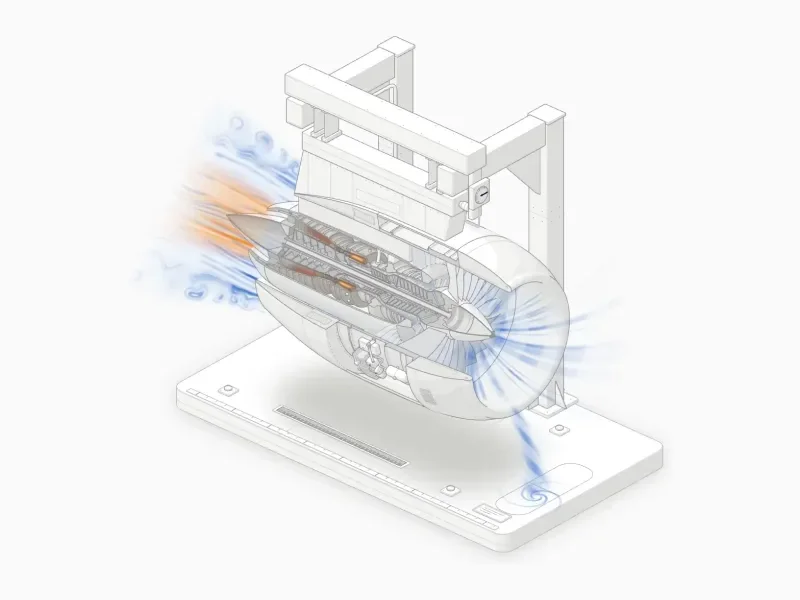 WebGL
WebGL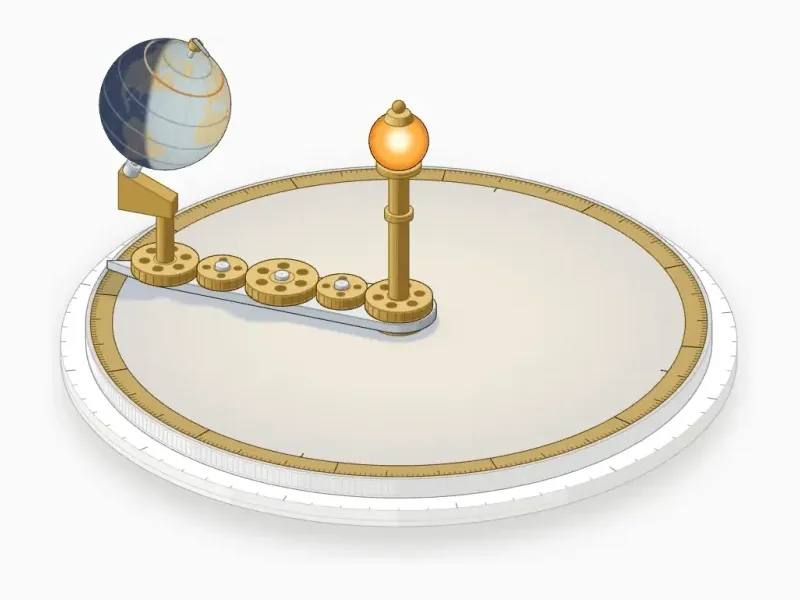 3D
3DSVG. The watch is SVG only: four tones by facing, and a painter’s order that is solved again on every frame while its bridges are apart. It redraws only the parts that move.
WebGL. The turbofan adds one canvas for the intake streaks, the bypass wind, the combustor flame, the turbine glow and the exhaust. Every value rides an envelope, so nothing pops, and the readout never disagrees with the picture.
3D. Seasons turns 26 parts in true 3D, re-projected every frame, with two canvases for the lamp’s light. Its readout comes from the Almanac’s solar formulas: at 50°N the day lasts 16 h 22 m in June and 8 h 04 m in December.73D is still a beta. A small turning figure runs at 60 fps; a dense 380-part test hand ran at about 20.
How long it takes
Detail costs time, and I would rather show the real numbers than guess. These are Claude’s active time from the first prompt to the shipped figure, review rounds included and idle gaps left out.
| Watch movement | 1 h 54 min | One pass, checked and fixed by the same agent. |
|---|---|---|
| Seasons | 1 h 57 min | Built alongside the watch, 3D audit included. |
| Raptor engine | 10 h 33 min | First working version in 38 minutes. |
| Turbofan | 14 h | First build in 4 h 41 min, then five review and fix rounds. |
The pattern holds across the collection. A first version that runs comes quickly. Most of the time goes into the second look, at four times the size, where the faults are: a cable through a duct, a nozzle shaded in steps, a blade folding into a sliver at the cut.
In your code
Every figure in the collection is also a React component, live and themeable down to the colour of its last line.
npm install anatomy-figures
import { Watch } from "anatomy-figures";

export default function Page() {
  return <Watch theme="light" />;
}
Each figure is its own entry, so importing one never pulls in the others:
import Turbofan from "anatomy-figures/turbofan";
Five themes come with it: dark, light, paper, blueprint and sepia. Pass one as theme, set one for a whole tree with AnatomyTheme, or pass your own --anatomy-* tokens. The figures on this site are the light theme with the card set to the colour of the page.
import { AnatomyTheme, Turbofan } from "anatomy-figures";

<AnatomyTheme theme="paper">
  <Turbofan />
</AnatomyTheme>

<Turbofan theme={{ base: "light", "--anatomy-card": "#fafafa" }} />
Every token. Every fill, line and label in a figure reads one of these 26 variables. Pass any of them in tokens, or inside a theme object. They are set on the figure itself, so they win over CSS from outside.
<Watch
  theme="light"
  tokens={{
    "--anatomy-card": "#ffffff",
    "--anatomy-lit": "#e5484d",
    "--anatomy-weight": "0.8px",
  }}
/>
| Light | Dark | Token |
|---|---|---|
| Surfaces | ||
--anatomy-cardThe card behind the figure. | ||
--anatomy-paperThe fill under every solid. Keep it equal to the card. | ||
--anatomy-topThe top face of every solid. | ||
--anatomy-shade-0Side faces turned furthest from the light. | ||
--anatomy-shade-1Side faces turned a little toward the light. | ||
--anatomy-shade-2Side faces turned mostly toward the light. | ||
--anatomy-shade-3Side faces facing the light squarely. | ||
--anatomy-faceThe body of the one lit part. | ||
--anatomy-lit-topThe top of the lit part. | ||
--anatomy-lit-shadeThe sides of the lit part. | ||
| Lines | ||
--anatomy-hiThe strongest lines: the subject’s outline. | ||
--anatomy-midStructure, major ticks and engraved labels. | ||
--anatomy-loThe base, the feet and minor lines. The default line. | ||
--anatomy-faintGrooves and the faintest guides. | ||
--anatomy-dotDot grids and screw heads. | ||
--anatomy-haloThe soft shadow under the base and under lifted parts. | ||
| Accent and colour | ||
--anatomy-litThe one accent: the part the reader should watch. | ||
--anatomy-redRed, used only where colour is the subject. | ||
--anatomy-greenGreen, likewise. | ||
--anatomy-blueBlue, likewise. | ||
| Text | ||
--anatomy-textThe figure number and the live readout in the card’s corners. | ||
--anatomy-mutedThe title and the hint in the corners. | ||
--anatomy-strongThe brightest text a figure draws. | ||
| Shape | ||
| 0.6px | 0.6px | --anatomy-weightThe width of every line. |
| 0.32 | 0.9 | --anatomy-halo-opacityHow dark the soft shadow is. |
| ui-monospace | ui-monospace | --anatomy-monoThe font of the corners and engraved labels. |
Without React, every figure is also a custom element:
import { define } from "anatomy-figures/element/turbofan";

define();

<anatomy-turbofan theme="dark"></anatomy-turbofan>
Install
Add the skill to Claude Code with one command:
npx skills add wheresryan22/anatomy
Or download the skill and unzip it into your skills folder:
unzip anatomy.zip -d ~/.claude/skills
Then open Claude Code in your project and ask for anything that works. Name the idea, not the drawing.8Six complete examples ship with the skill, from a dial gauge of about 300 lines to the Raptor engine, and Claude opens the closest one before it starts.
Limits
Claude is very good at building these and not always good at seeing them. It optimises for a figure that works, and a part can be right in every number and still look wrong. The fixes that mattered most came from watching a figure play and describing what felt off.
It is slow when it is good. The skill asks for at least forty parts in every figure and will not trade detail for speed on its own. If you need something quick, say so, and expect a Figure rather than a Hero.
3D is a beta. It turns one subject at a time, and a full audit of a turning figure takes fifteen to twenty minutes, so it is worth asking for only when a part really has to move in depth.
References are for mood. Give it a photograph and it will take the finish, not the object. A faithful copy of someone else’s drawing is not what it is for.
So treat the first figure as a draft. Play with it, notice what is wrong, say so, and ask again. How I built it shows what that loop looked like for the skill itself.
Questions
Does it need React?
No. The skill writes framework-free TypeScript that outputs SVG and HTML for any page, or React components for a React or Next.js site. Every figure in the collection is also a custom element you can drop into plain HTML.
Can I change a figure after it is made?
Yes. A figure is ordinary code in your project. Ask Claude for the change, or edit the model yourself: the parts, the readout and the motion all read from the same model, so one changed number moves everything with it.
Will it slow my page down?
Figures stop when they scroll off screen and redraw only the parts that move. Shaders render only while their effect is active and visible, with the device pixel ratio capped at 1.5, and under reduced motion they draw a single still frame.
Is it accessible?
Every figure takes keyboard focus and answers keys as well as the pointer. Its readout is announced to screen readers as it changes, and it goes still under reduced motion while still answering input.
Light or dark?
Both. Framework-free figures build in either theme, and the React components come with five themes or take your own colour tokens.
How do I get the best result?
Name the idea, add the true numbers you care about, and use the three words when you want them. Then play with the first figure, say what feels off, and ask again. Most of the quality comes from the second look.
What is the licence?
MIT, for the skill and for the figures.
- 1One hour and fifty-four minutes of active time, built in one pass and checked by the same agent.
- 2The machine is never copied from a reference picture. A reference can give the finish, the materials and the mood; the object is invented.
- 3Until a request matches, Claude sees only the skill’s name and its description. It reads the rest only when it needs it.
- 4Whatever the size, there is a working page in the browser within the first hour. The rest of the time goes into deepening it.
- 5The audit measured 6,320 overlapping pairs across 541 solids and found every one drawn in the right order.
- 6The plume, shock, splash and steam are WebGL, drawn between a back and a front SVG, so the stand passes in front of the flame.
- 73D is still a beta. A small turning figure runs at 60 fps; a dense 380-part test hand ran at about 20.
- 8Six complete examples ship with the skill, from a dial gauge of about 300 lines to the Raptor engine, and Claude opens the closest one before it starts.